Article
27 Oct 2025
How Much Does Starlink Cost for Businesses? UK Price Guide
When your business internet fails, every minute costs money. For UK businesses in areas with limited fibre options, or needing bulletproof backup connectivity, Starlink has become a serious contender.
So how much does Starlink actually cost for businesses? Hardware ranges from £0 to £2,470, monthly service from £75 to £1,000+, and professional installation adds £500-£1,200. Understanding your total investment requires breaking down each component.

Understanding Starlink Technology
Starlink delivers high-speed internet through an advanced constellation of low-earth orbit satellites, eliminating the need for traditional cable or fibre infrastructure. This makes it particularly valuable in two key business scenarios:
Primary Internet Connection: For businesses in rural or underserved areas where fibre options are limited, expensive, or simply unavailable.
Failover/Redundancy: As a backup system that activates automatically when your primary connection fails, ensuring business continuity without relying on the same physical infrastructure.
Unlike traditional satellite internet that suffers from latency exceeding 500ms, Starlink typically achieves 25-50ms latency, acceptable for most business applications including VoIP, video conferencing, and cloud-based software.
Total Cost Breakdown: What You'll Actually Pay
Starlink costs comprise three distinct elements that together determine your total investment:
Monthly Starlink Internet Service Fees
Starlink Kit Prices
Starlink Installation Costs
Monthly Starlink Internet Service Fees
Starlink completely restructured business pricing in 2025, introducing tiered "Priority Data" options that better align costs with actual usage requirements.
For Fixed Business Locations
Business Fixed Plan
Starting cost: £75/month (includes unlimited standard data + 40GB priority data)
Priority data upgrades:
1TB priority data: £150/month
2TB priority data: £300/month
Includes: Static IP address, business-grade support, 99.9% uptime SLA
Best for: Primary office internet or high-availability backup
What is Priority Data? Priority data guarantees consistent speeds even during network congestion periods. Once your priority allocation is consumed, speeds throttle to 1 Mbps download / 0.5 Mbps upload, still sufficient for basic operations but not ideal for multiple simultaneous users.
For backup/failover scenarios, most businesses find 40-100GB priority data sufficient since the connection only activates during primary outages. Our IT support specialists can determine how much you need during a free installation consultation.
For Mobile Business Use
Business Mobile Plan
Starting cost: £206/month (50GB priority data)
Priority data options:
1TB priority data: £808/month
5TB priority data: £4,038/month
Coverage: UK, European coastal waters, in-motion connectivity
Includes: Business support, maritime capability, automatic satellite switching
Best for: Maritime operations, mobile service teams, remote site work
For Budget-Conscious Scenarios
Residential Plan (Business Use)
Cost: £75/month
Limitation: Unlimited standard data only (no priority allocation)
Reality check: Works for small offices during off-peak hours or pure backup scenarios
Trade-off: No business SLA, consumer-grade support, potential congestion issues
Our recommendation: Acceptable for backup-only deployments where it rarely activates
Starlink Kit Prices - Hardware (One-Time Purchase)
The equipment you need depends entirely on your use case and installation location:
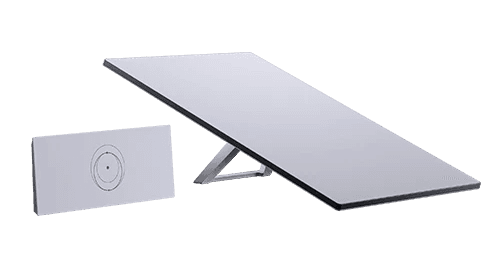
Standard Kit - £0 to £299
Best for: Fixed office locations, primary or backup internet
Coverage: UK mainland with clear sky view
New pricing model: £0 upfront with 12-month service commitment (£75/month minimum)
Traditional purchase: £299 upfront, no commitment required
Important: High-demand areas (primarily London and Southeast England) incur an additional one time £195 congestion surcharge fee
Performance: Handles 50-200 Mbps typically, suitable for offices up to 20 staff
Included router: Gen 3 WiFi 6 router with 3,200 sq ft coverage
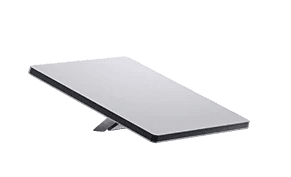
Mini Kit - £399
Best for: Temporary sites, mobile offices, rapid deployment scenarios
Advantage: Integrated WiFi eliminates separate router needs, ultra-portable
Power consumption: 25-40W (can run on portable power stations)
Trade-off: Smaller antenna means slightly lower speeds in congested periods
Ideal for: Construction site offices, pop-up locations, emergency backup

High Performance Kit - £2,470
Best for: Mission-critical applications, harsh weather environments, mobile connectivity
Enhanced capabilities: 135° field of view, superior throughput, weather-resistant
Business priority: Recommended when consistent performance is non-negotiable
Performance: Handles up to 400 Mbps, suitable for larger offices and remote locations
Mobile option: Flat High Performance variant available for vehicle/vessel mounting

Enterprise Kit - £659
Best for: Fixed business locations requiring high performance at lower cost
Specifications: Similar to Standard Kit but optimized for business use
Router: Not included - use enterprise-grade 3rd party router
Limitation: Not suitable for mobile/travel applications
Note: Limited availability - verify with Starlink before ordering
Clarifying Starlink internet speeds: The High Performance kit doesn't automatically translate to faster internet speeds. The Starlink network, not the hardware, is the primary determinant of your connection's performance.
All Starlink hardware can handle high speed internet, and your actual experience depends on your service plan and local network usage, rather than the specific kit you choose. Ultimately, the choice of kit should align with your specific use case and budget.
3. Professional Installation Investment
While Starlink equipment is technically "DIY-friendly," professional installation for business deployments offers significant advantages in reliability, performance optimisation, and long-term maintenance.
What Professional Installation Includes:
Site survey and line-of-sight analysis to identify optimal mounting location
Secure mounting with appropriate weatherproofing for permanent installations
Professional cable routing with proper external/internal protection
Integration with existing network infrastructure (firewalls, managed switches, failover routing)
Performance testing and optimisation
Documentation for your IT records
Warranty protection (DIY installations may void certain coverage)
Typical Installation Costs:
Simple roof/wall mount: £500-£750
Complex installations (difficult access, long cable runs, multi-building): £800-£1,200
Advanced integrations (automatic failover configuration, mesh network integration): £1,200-£1,800
Required Additional Components:
Starlink mounting bracket: £60-£120 (varies by installation type)
Professional-grade cable routing kit: £85
External cable protection and clips: £10-£25
Weatherproofing materials: £20-£40
DIY Considerations: While possible for temporary or low-stakes deployments, business installations typically benefit from professional expertise. Improper mounting can result in signal interruption from obstructions, weather damage from inadequate sealing, or performance degradation from suboptimal positioning.
Hardware Rental Options
Direct from Starlink: Business hardware rental is no longer available in the UK. The previous £100/month High Performance rental option has been discontinued.
Third-Party Rentals: For temporary requirements (events, construction projects, short-term deployments), several UK companies offer Starlink equipment rentals ranging from £150-£300/week depending on the kit type and duration. This can be cost-effective for:
Event connectivity (festivals, outdoor weddings, temporary venues)
Short-term construction sites (under 3 months)
Trial periods before committing to purchase
Emergency backup during primary system failures

Real-World Cost Scenarios
Let's examine actual total costs for common business use cases:
Scenario 1: Small Office Primary Internet (Rural Location)
Requirements: 8-person office, rural Devon, no fibre available
Hardware: Standard Kit - £0 (12-month commitment) Monthly Service: Business Fixed 40GB priority - £75/month Installation: Standard roof mount - £650 Additional Hardware: Mounting + routing kit - £150
First Year Total: £1,700 (£800 setup + £900 annual service) Subsequent Years: £900/year
Alternative Cost: Leased line in rural area - £350-600/month (£4,200-£7,200/year) + £2,000+ installation
Savings: £2,500-£5,500 annually vs traditional business broadband
Scenario 2: City Office Backup/Failover
Requirements: 25-person office, Manchester, existing 500Mbps fibre, requiring resilient backup
Hardware: Standard Kit - £299 (no commitment) Monthly Service: Business Fixed 40GB priority - £75/month Installation: Integration with existing network + automatic failover - £1,100 Additional Hardware: Managed router with failover capability - £300
First Year Total: £2,599 (£1,699 setup + £900 annual service) Subsequent Years: £900/year
Cost Per Hour of Avoided Downtime: If Starlink prevents just 4 hours of downtime annually (at £500/hour cost = £2,000 loss), the investment pays for itself immediately.
Scenario 3: Construction Site Temporary Office
Requirements: 6-month project, temporary site office, 5 staff
Hardware: Mini Kit - £399 (portable, reusable for future projects) Monthly Service: Residential plan (sufficient for temporary use) - £75/month Installation: Self-install (ground mount with sandbag base) Additional Hardware: None required (integrated WiFi)
6-Month Total: £849 (£399 hardware + £450 service) Per-Month Cost: £142
Alternative Cost: Mobile broadband or 4G router - £60-100/month but often unreliable speeds at remote sites
Advantage: Guaranteed performance, reusable hardware for next project
Starlink vs Alternative Solutions: When Does It Make Sense?
Solution | Monthly Cost | Setup Cost | Speed | Latency | Best For |
|---|---|---|---|---|---|
Starlink Business | £75-£300 | £650-£1,500 | 50-200 Mbps | 25-50ms | Rural primary, universal backup |
Fibre Leased Line | £650-£1,500 | £1,500-£3,000 | 100-1,000 Mbps | 1-5ms | Urban primary where available |
FTTP Business | £40-£150 | £0-£200 | 50-500 Mbps | 5-15ms | Urban primary (limited availability) |
4G/5G Backup | £30-£80 | £0-£300 | 20-100 Mbps | 30-70ms | Budget backup (same infrastructure risk) |
Bonded 4G | £150-£300 | £500-£800 | 50-150 Mbps | 30-60ms | Rural primary (congestion issues) |
Starlink Makes Strong Business Sense When:
✅ Rural/remote location with limited or no fibre infrastructure
✅ Backup/failover requirement independent of terrestrial infrastructure
✅ Temporary locations (construction sites, pop-up offices, event venues)
✅ Mobile connectivity needs (maritime, vehicles, remote field operations)
✅ Quick deployment required (operational in hours, not weeks/months)
✅ Avoiding expensive alternatives (rural leased lines often £400+/month)
Consider Alternatives When:
❌ Dense urban area with reliable gigabit fibre at competitive rates
❌ Latency-critical applications requiring sub-10ms response times
❌ Extremely high bandwidth needs exceeding 500 Mbps consistently
❌ Obstructed site without clear view of northern sky
❌ Budget-only decision and adequate FTTP/cable available under £50/month
Hidden Costs and Considerations
Congestion Charges in High-Demand Areas
Starlink introduced congestion surcharges for certain high-demand regions in the UK, primarily affecting:
Greater London
Parts of Southeast England
Some urban centres during rapid expansion
Impact: Additional £195 one-time charge for Standard Kit purchases in affected postcodes. The £0 hardware option may not be available in these areas.
Check before ordering: Starlink's coverage map indicates whether your location faces congestion charges.
Data Priority Usage Monitoring
Unlike traditional unlimited connections, Starlink's priority data model requires monitoring:
Typical Business Usage Patterns:
10-person office, moderate use: 20-40GB priority data/month sufficient
Video conferencing heavy environment: 60-100GB priority data/month
Large file transfers regularly: 150GB+ priority data/month
Once priority data is exhausted, throttled speeds (1 Mbps down) limit functionality. Plan appropriately or purchase additional priority data mid-cycle.
Power Consumption
Starlink dishes require continuous power:
Standard Kit: 75-100W average (£15-20/month electricity cost)
Mini Kit: 25-40W average (£5-8/month electricity cost)
High Performance: 110-150W average (£20-30/month electricity cost)
For backup scenarios, consider UPS (uninterruptible power supply) investment to ensure Starlink remains operational during power outages that might affect your primary connection.
Weather Performance
While Starlink operates effectively in most UK weather conditions, heavy snow accumulation or severe storms can temporarily impact performance. The system includes heating elements to melt snow, but sustained severe weather may cause brief interruptions.
Business impact: Minimal for backup scenarios (primary connection likely also affected). For primary connection deployments in harsh climates, factor in 99.5% uptime rather than 99.9%.
Integration with Existing Business IT Infrastructure
Starlink deployment should integrate seamlessly with your existing network architecture, not operate as an isolated internet connection.
Automatic Failover Configuration
For backup deployments, proper failover configuration ensures:
Automatic detection of primary connection failure
Seamless switch to Starlink within 30-60 seconds
Automatic failback when primary connection restores
No manual intervention required during outages
Implementation requires: Enterprise-grade router with WAN failover capability (£400+) or managed IT service to configure existing infrastructure.
Network Security Considerations
Starlink connections should integrate behind your existing firewall, not bypass security infrastructure:
Configure Starlink as WAN2 connection through firewall
Maintain consistent security policies across primary/backup connections
Implement VPN access if remote workers connect through Starlink
Monitor both connections through centralized network management
VoIP and UCaaS Performance
Starlink's latency characteristics support business telephony adequately:
VoIP call quality: Generally excellent (25-50ms latency acceptable)
Microsoft Teams/Zoom: No issues with standard video conferencing
Contact centre applications: Suitable for most deployments
Consideration: Minor latency increase vs fibre may be perceptible on international calls but rarely impacts usability.

Get Your Free Starlink Consultation
Understanding whether Starlink aligns with your business requirements and budget doesn't require commitment. We offer free, no-obligation consultations including:
Site feasibility assessment
Cost projection with all components
Performance expectations based on your location
ROI analysis for backup/failover scenarios
Integration planning with existing infrastructure
Alternative solution comparison
As technology infrastructure specialists, we bring expertise beyond simple Starlink installation. We evaluate Starlink within your broader IT infrastructure strategy, considering failover architecture, network security, performance monitoring, and integration with existing systems. We recommend Starlink when it's genuinely the best solution for your requirements, and when it's not, we'll tell you why and suggest alternatives.